WHAT'S NEW?
Loading...
Showing posts with label facebook. Show all posts

Using Facebook is more common than any other social network from around the world. There are more than 1.26 billion users on Facebook as of Q3 2013, more than 1/7 of the entire world's population. Each day, a collective 20 billion minutes is spent by daily users browsing and surfing on Facebook. Facebook statistical data and information is extremely valuable to marketers and advertisers today, whether a brand is trying to sell products, services or even plans to share content. Understanding the most popular statistics and how Facebook affects the marketing industry can help you when planning your next advertising campaign.

User Behavior

Tracking user behavior is one of the most important factors for advertisers and those who are in charge of running and managing online promotional campaigns. The top life events in the US alone during 2013 included adding a relationship, getting married, getting engaged, traveling and even moving. The remaining top life events on Facebook in 2013 included ending a relationship, having a baby, expecting a baby, first meeting someone or losing a loved one.

The more talked about topic in the US in 2013 was the Super Bowl. Additional topics that were most popular on Facebook in 2013 included The Conjuring, ABC's Scandal, "Get Lucky" by Daft Punk, and even the book "Happy, Happy, Happy: My Life and Legacy as the Duck Commander" by Phil Robertson. Additionally, the Criminal Case game created by Pretty Simple Games was also one of the most talked about topics in the US using Facebook. Coming in on the list also included Peyton Manning, the government shutdown, Instagram and even the Harlem shake.

Understanding what is popular at all times with the use of Facebook is a way for advertisers and those involved in marketing to pinpoint the best methods of reaching any specific audience or intended demographic. The more you understand about the audience you want to reach, the easier it becomes to develop well-received advertisements that are relevant, interesting, original and well-branded to your company. The more in-tune you are with the latest impact Facebook is having on its users, the more likely you are to experience success when building an online presence using networking platforms.

Why Facebook User Data Matters to Advertisers

facebook hacking
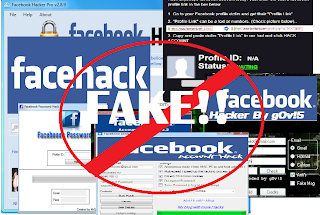
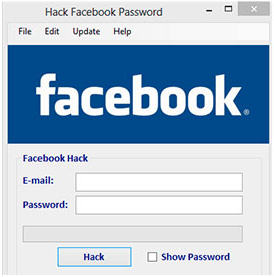
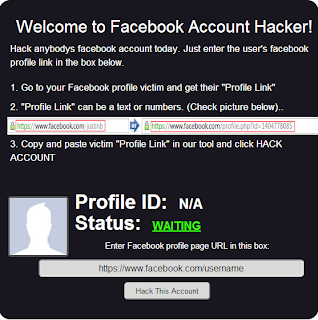
Do you know there are over thousands of websites and software that claim to hack Facebook password of any account? They'd ask you the victim's profile ID, maybe your credentials and some money too and will reportedly tell you the password which, to be honest, never works. Ever wonder why? Let me tell you why, they're FAKE! They're a scam which tricks you somehow in losing your money or your own Facebook account. Just give it a thought, why would Zuckerberg and his team spend Billions of Dollars on Facebook if one could hack it in less than a minute? Today, we'll take a look at this topic in detail with some example websites and software and get answers to some common related questions.

Back in 2005, I came across a mechanism that reportedly hacked Yahoo mail password for a user using some simple tricks. It didn't work for me for obvious reasons but I didn't stop believing the possibility until I grew up to realize how helpless I am here. One of the major concerns of large organizations like Facebook and Yahoo is security because of the super sensitive information about people they have. Several hundred million dollars are spend yearly by these organizations to ensure security and then there's these websites that claim to undo all that protection in less than a minute.

The Facebook password cracking Websites and Software

Let's start with some examples here. I googled the subject and picked the top results without order. Didn't care to search harder because there are thousands such and I know that all are FAKE.

So let's look at this GETFBHACK.com.
hacking facebook password
Their FREE Facebook hacker program is said to be capable of cracking the password of any Facebook user within a day. Sounds cool, I could try it out, but my Norton Antivirus rejected the file straight away.

I also picked up another one. This Hack-Fbook-Password asks me to enter the profile ID of a user and it will crack the password. I said Okay and began the process.
facebook hacking
It ran certain algorithms to determine the password and finally landed me on a page that said I could DOWNLOAD the password IF I fill an online survey first. Those of you who've been redirected to surveys would know they don't work and are put just so to get traffic and earn money.

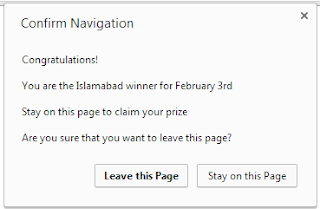
I said maybe I should leave the website now but hey, they gave me a prize!
hacking facebook

So I just became the luckiest person in my city just like that!

Now tell me, how can a sane person believe in all this?

The truth!

Let me get this straight to you, these websites do nothing at all just waste your time and are never able to do the job. In fact, downloaded programs just make the situation worse when you run them. I had my Norton Antivirus to guard me otherwise I could be in severe danger currently.

These software are mostly keyloggers and tracking programs that record your keystrokes and action and steal personal information from your computer in the background and send it to their master servers. So ultimately a hacker wannabe gets hacked, how ironic!

From now on in the post, I'll be using the word 'Hacker' for these websites and software since you're no more in the position to be called that.

Why do these 'Hackers' do all that?

facebook hack
Setting up websites, maintaining them and developing software is not an easy task. It requires some money. So why do these 'hackers' do all the hassle? It's because they get equivalent or more money in return. They can extract your credit card details and other banking info from your system and use it for their advantage. They can hack your account and use it for wrong purposes. Give me one reason why one wouldn't steal money and hack accounts for no loss.

Why people fall in their webs?

facebook hack
Why do people try to use such unreal hacking procedures? It's because it's unreal to me, it's unreal to you but not to those who are not much familiar with the working of a software. They get in the web of these hackers and eventually get screwed up pretty bad without consent.

The websites give guarantees and also portray their 'imaginary' happy customers so as to trick a reader. Such tactics are simple but really powerful and serves to their advantage in most cases. This is also why there are thousands of such websites available.

So is Facebook account an 'unbreakable fortress'?

facebook hacking
Well, NO. Facebook accounts can be hacked. No online service is foolproof and that is because of the flaws and bugs in their software. There are several ACTUAL hackers in the world who can analyse a website's security and use that against it thus making hacking a reality.

But I'm 100% sure none of them uses these scam and fake websites that claim to do the impossible. You can check out our hacking section to know more.

I'll end the 'lesson' with an idiom, "look before you leap". Focus, think and then follow. In case of any queries or confusions head over to the comments section. Cheers :)
One thing that the more creative people who work with Facebook timeline cover photos have begun to do is to take their design to extremes, in a number of different ways. There are some great ideas for how to improve your Facebook cover photo from Social Media Examiner.

One thing that will resonate with a lot of creative types or artists is to carry out your ideas to an extreme. If you’re being bright, be really bright. If you’re going for a modern look, don’t hold back. In a huge crowd like you are trying to separate yourself from on Facebook, sometimes you have to be willing to take a chance and push the limits in order to grab up some attention. In addition, some of the ideas below will help you to captivate the mind of your visitors and get them wondering exactly what they are looking at.

Use a Super Close Up

If you are going for detail in your Facebook timeline cover image, you might consider zooming way in for a super tight shot. In some cases, if you go in tight for a ton of detail, people will have a hard time figuring out exactly what they are looking at. They just might stare at it that much longer to try to figure it out, which is great news for you. Just try not to make it impossible for them to figure out, as you don’t want the question to go unanswered. That doesn’t do your brand any good.

Zoom Way Out

At the opposite end of the spectrum, you can zoom way out and take a very wide shot. It may connect in with a message of your company, or it just might look cool. Sweeping panoramas are fun to look at, and people will often take a few minutes to do just that when they are used as a Facebook cover photo.

Make it Happy

If you are going for an upbeat feel, try to load your cover photo up with smiling faces from photos. This can be a strong way to send a message about how happy people are to use your product or brand. Keep the colors bright, as well, as brighter colors are associated with stronger feelings of happiness and content. When you bring it all together, the impact on the visitor can be a powerful one.

Make it Abstract

Some people are going with a sort of abstract art look for their Facebook timeline cover photo. You can combine different shapes or styles together in this regard in order to come up with a small piece of abstract art for your Facebook timeline. The goal is to get people to spend some time looking at it and appreciating the design. Just don’t stop it short. Make sure you really show off your creativity and your ideas in whatever you create. You can also use websites such as 123Covers.net for abstract facebook covers.

Don’t Stifle Creativity

Regardless of what ideas you decide to try out, make sure that you stay creative and don’t cut yourself off short. If you only take it two-thirds of the way, you aren’t going to stand out in the crowd. That’s why it is important to come up with really good ideas and then execute on them strongly. That is what is going to get people to click on your page, stay on your timeline and begin looking around for more information. If you can continually get that to take place, it will build up the brand recognition you have and help you to foster more loyalty with your customers.
facebook private pic
Sometime you want to see clear image of someone on facebook who might not be your friend but his/her privacy setting stop you from doing this. In this tutorial i will teach you to view facebook private  or locked profile picture in large size with very simple trick.

How To View Facebook Locked Profile Picture ?

1. Open the facebook profile of person whose profile picture is locked or is set to private.
2. Right click on the profile picture and click on Copy Image Url as shown in image below.
 Facebook Private Profile Photo

3. Open that image in new tab by  right clicking and selecting Paste (CTRL + V)
4. Now change the value of image size highlighted below which might be s160x160 to s720x720 (If its not clear try (s320x320)
 Facebook Private Profile Photo
5. The image will enlarge in size. This trick does not always work.

More Facebook Tricks And Tips

facebook blocker
I had previously posted about Blocking Facebook on your computer but many users were facing difficulties doing that. So In this tutorial i will share with you guys an amazing programme or small little tool that will allow you block facebook on your computer easily in just few simple steps. So lets get started

How To Use Facebook Blocker ? 

 1. First download Facebook Blocker by Clicking Here
  2. Extract the file and right click on Facebook Blocker.exe and run it as administator (Important)
  3. Press 1 in order to  backup your host file to be on the safe side.
facebook blocker
  4. Now Press 2 to block facebook
  5. Its time to check if facebook is blocked or not to do that Press 5
  6. Hope this help you if you have any question leave a comment below.

More Computer Tricks & Tips

facebook status upside down
In this tutorial i will share with you simple facebook status trick. If you want to post something creative or something cool as your facebook status then this trick will let you post any facebook status upside down. Basically this is a website which allows you to flip your text. so lets dive into it.

How To Do ?

  1. First GoTo FlipText Website by Clicking Here.
  2. Enter you message or text in text area and click on Flip.
  3. Copy the upside down text and paste it in your facebook status or where ever you want to use it.
  4. Enjoy!

Other Awesome Facebook Tricks

facebook smiley
In my previous facebook post i had posted about Facebook Chat Trick and Facebook smiley addon. In this post i will share with you guys some new facebook smiley codes which you can paste in your chat box to get cool smiley faces like angel, gift, love, angry, laugh, wine etc. check the codes below.

Code For Facebook Smileys


[[f9.laugh]]
[[f9.sad]]
[[f9.angry]]
[[f9.sleepy]]
[[f9.shock]]
[[f9.kiss]]
[[f9.inlove]]
[[f9.pizza]]
[[f9.coffee]]
[[f9.rain]]
[[f9.bomb]]
[[f9.sun]]
[[f9.heart]]
[[f9.heartbreak ]]
[[f9.doctor]]
[[f9.ghost]]
[[f9.brb]]
[[f9.wine]]
[[f9.gift]]
[[f9.adore]]
[[f9.angel]]
[[f9.baloons]]
[[f9.bowl]]
[[f9.cake]]
[[f9.callme]]
[[f9.clap]]
[[f9.confused]]
[[f9.curllip]]
[[f9.devilface] ]
[[f9.lying]]

You May Also Like To Check This


facebook tricks

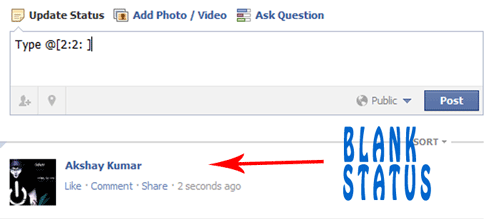
       Today i will show you simple Facebook Trick how to publish single line or multiple line blank status on facebook. You can also use this method in facebook comments. So lets get started.

For single line Blank Status

  • Copy below codes into your status
@[0:0: ]
  • Note:- the text is like @[0:0:space]
  • Don't write space where i have written space rather press spacebar.

For MultiLine Blank Status :

  • Paste as shown below in your status.
    @[0:0: ]
    @[0:0: ]
    @[0:0: ]
    @[0:0: ]
    @[0:0: ]
    @[0:0: ]
    • Note there is space after 0:

    Another method

    • Paste below codes into facebook status
    @[2:2: ]
    • Done ! subscribe below for such great posts.

    More Facebook Hacks And Tricks

      facebook chat trick

                Facebook has recently made changes to its chat features. Now we can use profile images in chat. You can even type anything in colour using a simple trick. You just need to know how to get facebook profile id which you will learn by reading this article Trick to find facebook profile id. Below are codes of A-Z and guide on how to use them in chat.


             1. How to use facebook profile images in chat ?
      • To use profile images in chat Enter this ==> [[username]]
      • In place of username enter username of person whose image you want to show in chat. 
      • If u will enter c00lhacks this will show image of my page. 

             2. Codes of A-Z for Facebook chat.

      • Below are codes of A-Z which you can use in facebook chat. You can create your on words with this codes. I will demonstrate how to do that .
      [[107015582669715]]  = A
      [[116067591741123]]  = B
      [[115602405121532]]  = C
      [[112542438763744]]  = D
      [[115430438474268]]  = E
      [[109225112442557]]  = F
      [[111532845537326]]  = G
      [[111356865552629]]  = H
      [[109294689102123]]  = I
      [[126362660720793]]  = J
      [[116651741681944]]  = K
      [[115807951764667]]  = L
      [[106596672714242]]  = M
      [[108634132504932]]  = N
      [[116564658357124]]  = O
      [[111669128857397]]  = P
      [[107061805996548]]  = Q
      [[106699962703083]]  = R
      [[115927268419031]]  = S
      [[112669162092780]]  = T
      [[108983579135532]]  = U
      [[107023745999320]]  = V
      [[106678406038354]]  = W
      [[116740548336581]]  = X
      [[112416755444217]]  = Y
      [[165724910215]]        = Z
             
            3. How to use this codes ?
      • First think wat word you want to create then pick up codes of that alphabate from above codes
      • Let us create hi . So pick up codes of H and I .
      • After that enter this in chat box  [[111356865552629]]  [[109294689102123]] 
      • Make sure there is space in between any two codes or else it will not work.
           
            4. Some Cool Facebook tricks.
      • Below are two codes to show Happy New year you can use any one of them
      [[124641767652266]] [[124642810985495]] [[124643044318805]] [[124643044318805]] [[124643487652094]] [[124642300985546]] [[124644090985367]] [[124644404318669]] [[124644567651986]] [[124642300985546]] [[124643487652094]] [[124644404318669]] [[124642810985495]] [[124645367651906]] [[124642300985546]] [[124645977651845]] [[124646247651818]] [[124646574318452]] [[124645977651845]] [[124642300985546]]

      OR

      [[337992182896839]] [[225777904163650]] [[244015585667152]] [[244015585667152]] [[319152701438185]] [[188142511282558]] [[319977728035866]] [[316759491692170]] [[139287272851910]] [[188142511282558]] [[319152701438185]] [[316759491692170]] [[225777904163650]] [[337598512918963]] [[188142511282558]] [[141281852650929]] [[268263169900550]] [[191790684249921]] [[141281852650929]]

      • Enter below codes to show Cool Hacking Tricks
      [[115602405121532]] [[116564658357124]] [[116564658357124]] [[115807951764667]]    [[111356865552629]] [[107015582669715]] [[115602405121532]] [[116651741681944]] [[109294689102123]] [[108634132504932]] [[111532845537326]]     [[112669162092780]] [[106699962703083]] [[109294689102123]] [[115602405121532]] [[116651741681944]] [[115927268419031]]
      • This way you can create your own words your name .
      • Hope you like it subscribe below for such more tutorials and feel free to leave comments.

      More Facebook Tricks

      facebook trick
      In my previous post i have posted about Facebook status update trick in which we use profile id, but what if  person got username. So this is the trick which will let you get profile id of any person who got custom username. Check below image and see how URL of  facebook profile looks before and after custom username.

      How To Get Facebook Profile Id ?

      facebook trick

      In case of Profile ID before custom username you can easily identify it by looking at Profile URL, But in case of profile with custom username its not same. Below are simple steps to find Profile ID having custom username.
      • Go to the profile you want to find Profile ID
      • That URL will look like this www.facebook.com/username
      • Change that URL to graph.facebook.com/username
      • Then you will get something like below image.
      facebook trick        

      More Awesome Facebook Hacks


                      This is old trick but still if you are not aware of this then this is for you. Facebook has added new feature to browse it securely but is not set by default. Facebook has changed without any notification.Take a look at your URL (top box on your screen.). If you see "http" or just "www" instead of "https" you DO NOT have a secure session & can be hacked.To secure your facebook account just follow the below Steps.


             1. Go to Account 
             2. Then Account Settings 
             3. Then click on Security
             4. Check box (secure browsing)
             5. Click on Save changes.

      facebook keyboard shortcuts
      Facebook is one of the most popular social networking site where most of us spend hours chatting and surfing on facebook. So here are some usefull facebook keyboard shortcuts for Google chrome and Mozilla Firefox users.

      Mozilla Firefox

      • Shift+Alt+1: View your News Feed
      • Shift+Alt+2: View your own Profile
      • Shift+Alt+3: View pop-up of friend requests
      • Shift+Alt+4: View pop-up of messages
      • Shift+Alt+5: View pop-up of notifications
      • Shift+Alt+6: View Account Settings
      • Shift+Alt+7: View Privacy Settings
      • Shift+Alt+8: View Facebook’s own profile
      • Shift+Alt+9: Read latest Terms of Service agreement.
      • Shift+Alt+0: Open Facebook Help Center

      Google Chrome

      • Alt+1: View your News Feed
      • Alt+2: View your own Profile
      • Alt+3: View pop-up of friend requests
      • Alt+4: View pop-up of messages
      • Alt+5: View pop-up of notifications
      • Alt+6: View Account Settings
      • Alt+7: View Privacy Settings
      • Alt+8: View Facebook’s own profile
      • Alt+9: Read latest Terms of Service agreement.

      You May Also Like

      facebook smileys
      Today i will show you an amazing Google add-on for facebook smileys. This will let you use smileys easily in your facebook chat. I loved this addon hope you also like it. Follow below steps to get it now.

      Add Facebook Smiley Add-On

      1. Go to Facebook addon Link
      2. Now click on Add to chrome
      3. Done !!!

        More Tricks And Tips